Download EOS Digital Info v1.4
Get the latest stable build of the Canon Shutter Count tool. Choose the version that best matches your camera’s age for optimal connection stability.
Tips: Shutter Count ( available in SDK2.14 / not supported in SDK 3.5 )
EOS Digital Info v1.4
- ★ Best for newer DSLRs (5D Mark III, 70D, 6D, 7D Mark II, Rebel T6i).
- ★ Optimized for Windows 10 and Windows 11.
- ★ Improved USB 3.0 communication stability.
File size: ~1.3 MB | Free · Mirror hosted by this site
EOS Digital Info v1.4 (Legacy)
- ● Specifically for older DIGIC 4 models (5D Mark II, 50D, 450D, 1100D).
- ● Better compatibility with Windows 7 and legacy hardware.
- ● Lightweight and standalone executable.
File size: ~1.6 MB | Free · Mirror hosted by this site
Download Mirror & Original Source
The download buttons on this page point to a mirror hosted by this independent resource site (not the developer). The original v1.4 release is published by the software author on SourceForge — if you prefer the original source, get it there.
This site’s mirror: the red download buttons above (Terabox-hosted mirror for faster access in some regions).
System Requirements
- OS: Windows 7, 8, 10, 11 (64-bit)
- Processor: 1GHz or faster
- RAM: 512MB Minimum
- Framework: .NET Framework 4.5+
- Interface: USB 2.0 / 3.0 / USB-C
- Mac Support: Via BootCamp/VM only
Note: This utility does not require installation. Simply extract the ZIP file and run the .exe as Administrator.
3-Step Quick Start Guide
1. Extract the Package
The download is a compressed .zip file. Use Windows Explorer or 7-Zip to extract the folder to your Desktop or a dedicated “Tools” directory. No installation required.
2. Run as Administrator
Right-click on EOSDigitalInfo.exe and select “Run as Administrator”. This ensures the software has the necessary permissions to access the Canon SDK layers.
3. Connect & Read
Connect your camera via USB. Turn the camera ON. Click the “Connect” button in the software. Your shutter count and serial number will appear instantly.
Release Notes v1.4
Troubleshooting Your Download
Encountering an error while running the tool? Here are the most common solutions.
🛡️ “Windows Protected Your PC” Warning
Because EOS Digital Info is an open-source tool without an expensive digital certificate, Windows SmartScreen may flag it. This is a “False Positive.” To run it, click “More Info” and then “Run Anyway.”
⚙️ Error: “EDSDK.dll not found”
This happens if you run the .exe file directly from the ZIP folder without extracting it first. Please Extract All files into a folder so the software can locate the necessary Canon SDK libraries (EDSDK.dll) included in the package.
📷 Software doesn’t see my camera?
Ensure your camera is set to “PC Connection” mode (if applicable) and that no other software (like Adobe Lightroom or EOS Utility) is open. Try a different USB port, preferably a direct port on your motherboard rather than a USB hub.
Still need help or have a question about a specific model?
View Detailed Compatibility ListInside EOS Digital Info v1.4
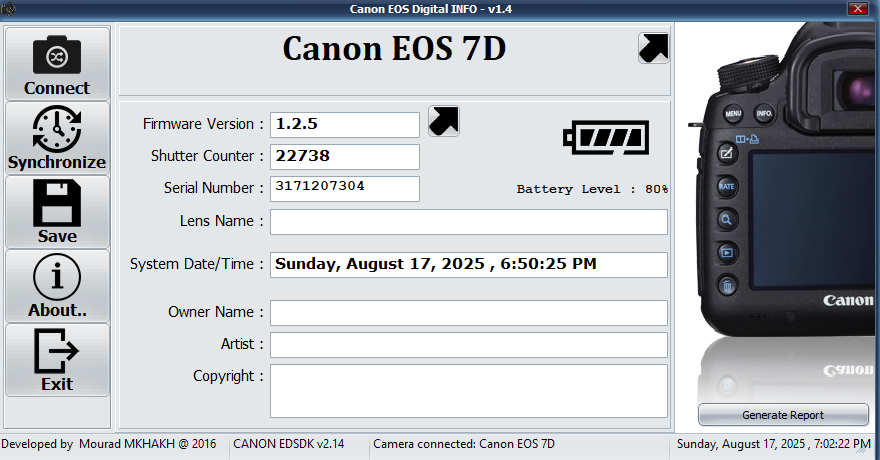
Take a closer look at the user interface and key diagnostic features before you run the utility on your workstation.
1. Connection Panel
The top-left button allows for instant USB handshake. Once highlighted, it confirms that your Canon SDK is communicating with the camera hardware.
2. Actuations Display
The center section provides a high-visibility readout of the Shutter Counter. This is the raw value pulled from the camera’s internal EEPROM.
3. Metadata Editor
Accessible via the “Settings” or “Edit” tab, this allows you to overwrite the Owner Name and Artist fields permanently within the camera body.
SEO Note: Keeping your camera firmware updated to the latest version before using EOS Digital Info ensures that all diagnostic fields are populated correctly without “Unknown” errors.
Your Privacy is Our Priority
Unlike many web-based “shutter checkers” that require you to upload high-resolution images to their servers, EOS Digital Info operates 100% locally on your machine.
- 🛡️ Offline Mode: No internet connection required to read shutter data.
- 🚫 No Data Collection: We never track your serial numbers or location.
- 💾 Zero Cloud Uploads: Your private metadata stays on your hard drive.
Clean & Portable Utility
EOS Digital Info is a portable application. This means it doesn’t scatter files across your Windows Registry or System32 folders.
How to Uninstall:
- Close the application.
- Delete the extracted folder from your computer.
- That’s it—no residual “junk” files or registry keys left behind.
Note: Since the tool is open-source, the source code is transparently available for audit by the global developer community.
Get More from EOS Digital Info
Beyond simple shutter counting, EOS Digital Info v1.4 offers powerful tools for studio management and professional equipment maintenance.
Batch Clock Synchronization
Managing a multi-camera shoot? Use the “Sync Date/Time” button to align every Canon body to your PC’s atomic clock. This ensures your wedding or event photos are perfectly chronological in post-processing.
Generate PDF/Text Reports
Selling your camera on eBay or MPB? Use the “Save Report” feature to export a verified text file containing your shutter count and serial number. This acts as a digital “Certificate of Health” for potential buyers.
Firmware Integrity Check
Easily identify if your camera is running outdated Canon firmware. The tool displays the exact version number, allowing you to quickly determine if you need to visit the official support page for security and feature updates.
Ready to optimize your workflow?
Join over 100,000+ photographers who trust EOS Digital Info for their equipment diagnostics.
Back to Download ↑